Excel is still running finance. Govern it before it breaks something important.
Many financial teams run critical work in decentralized Excel files. Replacing those files is hard. A governance layer provides a structured way to identify, prioritize, and manage spreadsheet risk.
June 2, 2026Excel GovernanceFinancial RiskAI Audit
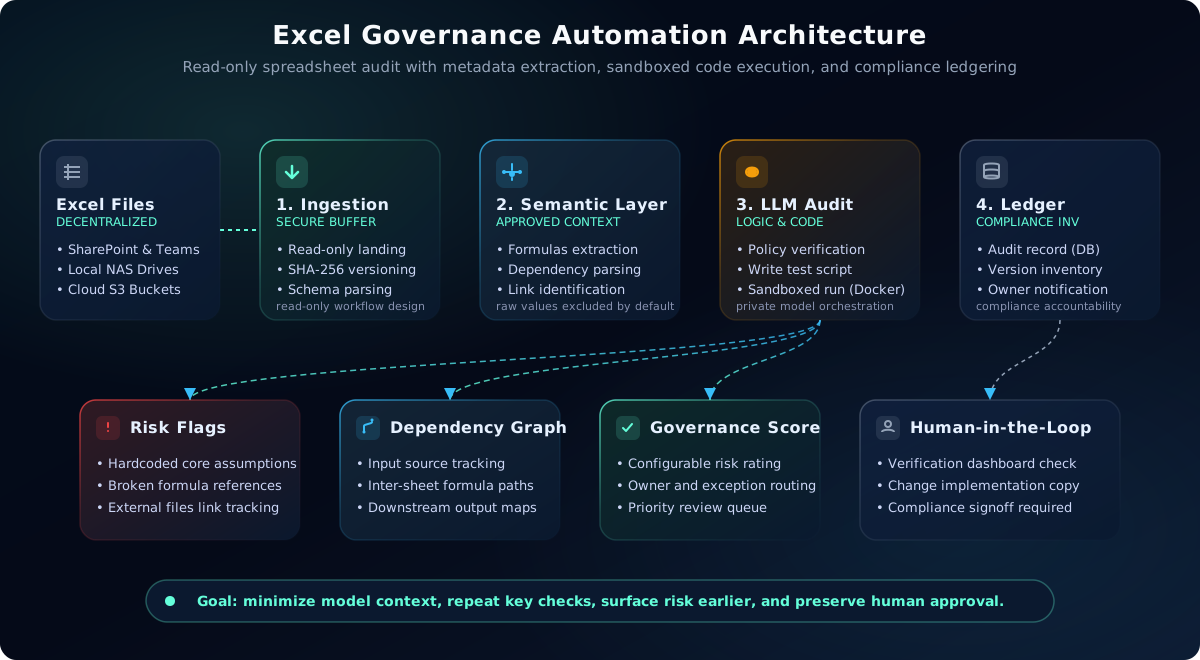
Reference architecture for read-only spreadsheet governance. The system audits structure, formulas, metadata, and execution results without overwriting the source Excel file.
The mistake: feeding the whole spreadsheet to an LLM
Financial spreadsheets can be huge. They have formulas, hidden sheets, external links, named ranges, manual overrides, and years of small changes.
Feeding the whole workbook into an LLM prompt is the wrong approach. It breaks context limits, exposes more data than needed, costs too much, and still leaves the model doing raw math it may not handle consistently.
The better approach is code-execution-based governance. The LLM should review structure, formulas, and policy logic. Python should inspect the workbook, trace dependencies, run checks, and produce evidence.
That split matters for finance. The model helps reason about intent and controls. The code does the math, so every finding can be traced back to a workbook hash, sheet, cell range, formula, and executed check.
Read-only
the governance workflow reviews a preserved copy and does not overwrite the source workbook
Minimized
model context is limited to the approved formulas, metadata, structure, and policy needed for review
Testable
deterministic code handles calculations, reconciliations, and repeatable checks
Traceable
hashes, findings, owners, approvals, and exceptions create an evidence trail
The architecture: govern Excel without replacing Excel
The system starts by watching SharePoint, network folders, local NAS, or cloud buckets. When a spreadsheet changes, it copies the file into a secure read-only landing zone and creates a SHA-256 hash. That hash becomes the file fingerprint.
Then a parsing layer extracts metadata: sheets, dimensions, authors, timestamps, formulas, named ranges, links, and dependency graphs. Raw row values are not sent to the model by default.
The LLM acts like a senior model risk reviewer. It reads the abstract schema, company policy, and formula map. When deeper checks are needed, it writes small Python scripts that run inside a sandbox with strict limits.
hardcoded values inside formula blocks
broken references between sheets
external links to old files
duplicate formulas with small hidden differences
tax or fee logic copied into many places
manual overrides in high-materiality tabs
unexpected text in numeric columns
two sheets that should reconcile but do not
What the finance team gets
The output is not another spreadsheet full of comments. It is a governance scorecard and a clear issue list.
The reference architecture can assign a configurable risk rating from documented factors such as complexity, hardcoding density, broken references, external links, formula drift, and failed consistency checks. Material findings can then be routed to owners, managers, or compliance teams.
The same process can generate documentation: what the workbook does, what inputs it uses, how calculations flow, and what outputs matter. That creates a living model inventory for files that were previously understood by only one or two people.
For business owners, the value is earlier visibility into control gaps across close, reporting, pricing, fees, tax schedules, and risk files. Well-governed spreadsheets make it easier to see which files have review evidence and which ones need attention before they drive a business decision.
Core guardrails for finance
Read-only source preservation
The reference workflow treats the source file as read-only. Remediation happens manually or on an explicitly versioned copy.
Context minimization
The model receives only the approved formulas, metadata, structural schemas, and policy context needed for the review. Raw workbook rows are excluded by default unless a separately approved control requires them.
Where this matters most
This pattern is useful anywhere Excel still supports financial decisions, controls, or reporting.
P&L workbooks
risk models
treasury reports
portfolio reconciliation files
fee calculation spreadsheets
tax and regulatory schedules
pricing sheets
monthly close packs
How it can be deployed
This architecture does not force one model choice. The same governance flow can run with local models, enterprise APIs, or a hybrid model route.
Local deployment
Self-hosted orchestration with an approved open-weight model, private parsing workers, constrained code sandboxes, and durable audit storage.
Secure API deployment
Enterprise model APIs can be used when their private-networking options, contracted retention terms, and policy controls fit the risk profile.
Hybrid governance
Sensitive workbooks can stay local while lower-risk metadata tasks use managed APIs. The routing decision depends on data sensitivity, cost, latency, and audit rules.
The bigger point
You do not need to replace Excel on day one to manage spreadsheet risk. You can add a governance layer around the files finance teams already use.
That layer makes hidden spreadsheet risk visible, gives owners a clear scorecard, and helps leadership see which files deserve review first.
Need governance around financial spreadsheets?
LetuxTech can help financial teams build a read-only spreadsheet governance layer that assigns configurable risk ratings, documents logic, detects control gaps, and alerts the right owners.
We can deploy it with local models, secure enterprise APIs, or a hybrid setup depending on data sensitivity, cost, and infrastructure constraints.